
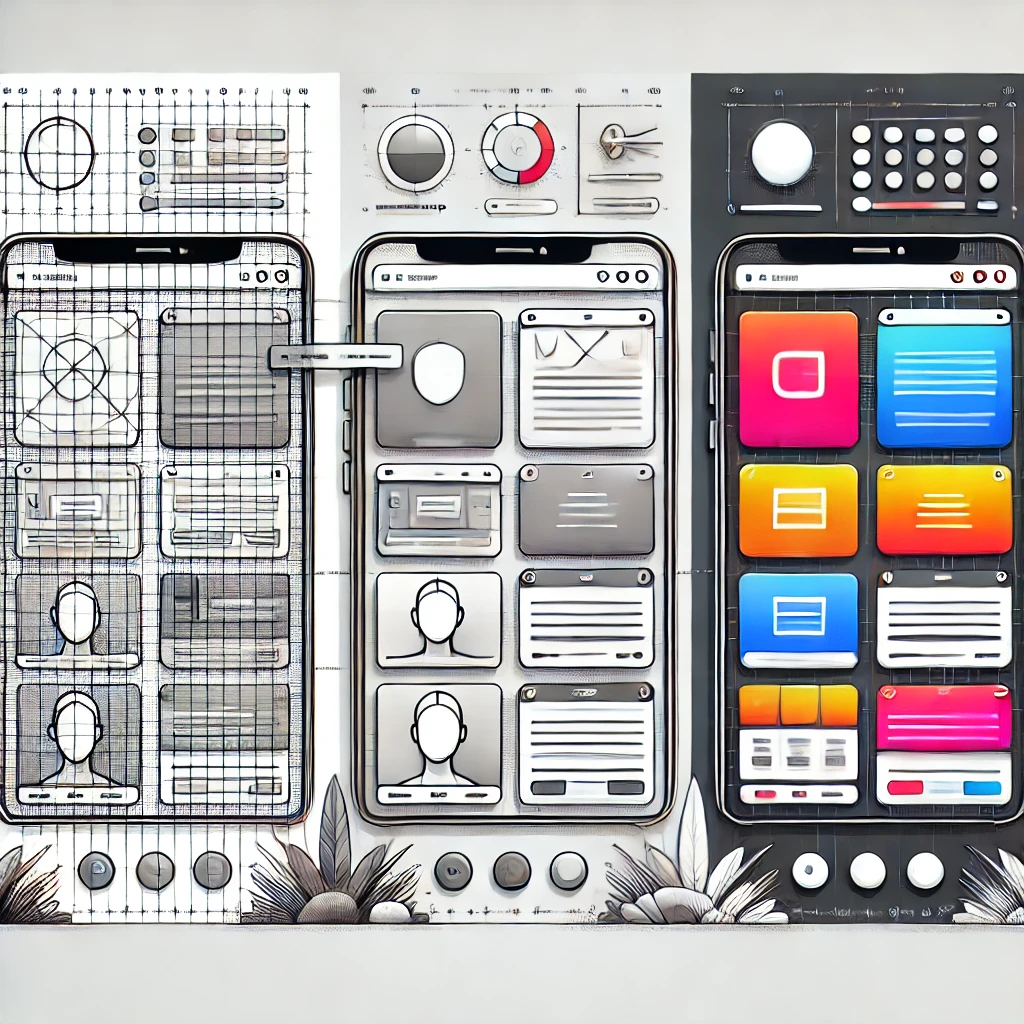
In digital product development, few topics generate as much confusion as the distinction between wireframes, mockups, and prototypes. These three artifacts are often mentioned together, sometimes used interchangeably, and frequently misunderstood. Yet each one plays a very specific role in the journey from idea to fully functional digital product.
Understanding the differences between these three stages is not merely a design concern. It is a strategic capability for product managers, project managers, developers, business leaders, and innovation teams. Using the right artifact at the right moment can dramatically reduce risk, accelerate delivery, improve alignment, and increase the overall quality of the final product.
This article explores in depth what wireframes, mockups, and prototypes are, how they differ, when to use each one, and how they collectively support modern agile and product-driven organizations.
Why This Distinction Matters in Product Development
Before diving into definitions, it is important to understand why this distinction is so critical.
Many digital products fail not due to lack of technology, but because:
- Expectations between stakeholders are misaligned
- User experience is poorly validated
- Too much is built before enough is tested
- Visual design is mistaken for usability
- Development begins before the concept is stable
Wireframes, mockups, and prototypes exist precisely to prevent these failures. Each artifact addresses a different type of uncertainty:
- Wireframes reduce conceptual risk
- Mockups reduce visual and branding risk
- Prototypes reduce usability and flow risk
When used correctly and sequentially, these three tools form a progressive validation pipeline.
Wireframes: Structure Before Style
What Is a Wireframe?
A wireframe is the most basic and abstract representation of a digital interface. It focuses entirely on:
- Layout
- Information hierarchy
- Content placement
- Navigation flow
- Core functionality
Wireframes are intentionally low fidelity. They use:
- Simple boxes
- Lines
- Placeholder text
- Grayscale or minimal color
- No final visual design
The goal is not to impress — it is to think clearly.
What Wireframes Are Used For
Wireframes are used at the earliest stage of design and discovery. Their main purposes include:
- Translating business requirements into visual structure
- Mapping user journeys and navigation flows
- Defining what content appears where
- Validating assumptions with users and stakeholders
- Supporting backlog refinement and user story creation
They allow teams to answer critical questions such as:
- What will the user see first?
- What actions are most important?
- How many steps does a task require?
- What information is essential vs optional?
Key Characteristics of Wireframes
- Low fidelity
- Fast to create and modify
- Easy to critique
- Minimal emotional attachment
- Focused on functionality, not aesthetics
Because wireframes are simple, feedback tends to be more honest and practical. People feel more comfortable suggesting changes because nothing looks “finished”.
Typical Wireframing Tools
Common tools for wireframing include:
- Balsamiq
- Axure
- Omnigraffle
- HotGloo
- POP (Prototyping on Paper)
In many cases, even pen and paper outperform sophisticated tools during early ideation.
Mockups: Visual Design Takes Shape
What Is a Mockup?
A mockup is a high-fidelity static visual representation of what the final product will look like. It introduces:
- Real colors
- Typography
- Branding
- Icons
- Visual hierarchy
- Detailed spacing
Mockups show the product as it will appear, but they do not include full interaction logic.
If wireframes answer “Where does everything go?”, mockups answer “How will this look?”.
What Mockups Are Used For
Mockups are used when the structure is already validated and the focus shifts to:
- Visual identity
- Brand consistency
- Aesthetic appeal
- Accessibility and readability
- Stakeholder approval
They are essential for:
- Marketing alignment
- Design systems development
- Executive approval
- Client presentations
- Pre-development validation of UI style
Mockups also become the visual reference for developers during implementation.
Key Characteristics of Mockups
- High fidelity
- Static (non-interactive)
- Pixel-accurate
- Visually polished
- Emotionally engaging
Because mockups look “finished”, they tend to generate stronger emotional reactions. This is both an advantage and a risk. Stakeholders may fall in love with a look that still needs usability validation.
Typical Mockup Tools
Common tools for mockups include:
- Photoshop
- Sketch
- Illustrator
- Axure
- UXPin
- Figma
These tools allow precise control over layout, typography, and visual assets.
Prototypes: Testing Usability and Interaction
What Is a Prototype?
A prototype is a functional or semi-functional representation of a product that allows users to:
- Click
- Navigate
- Interact
- Simulate real usage
Prototypes can range from:
- Low-fidelity clickable flows
- To highly realistic, interactive simulations
Unlike wireframes and mockups, prototypes focus on behavior, not just appearance.
What Prototypes Are Used For
Prototypes are critical for:
- Usability testing
- User flow validation
- Interaction design testing
- Performance of navigation paths
- Identifying friction, confusion, and drop-off points
They allow teams to observe how users actually behave, not just what they say they prefer.
Prototypes answer questions such as:
- Do users understand how to navigate?
- Are calls to action clear?
- Is the workflow intuitive?
- Where do users hesitate or get lost?
Key Characteristics of Prototypes
- Medium to high fidelity
- Interactive
- Behavior-oriented
- Realistic user flows
- Ideal for user testing
Good prototypes often uncover design assumptions that would never surface in static reviews.
Typical Prototyping Tools
Common tools for prototyping include:
- Keynote
- POP
- Axure
- Proto.io
- InVision
- Figma (interactive mode)
In advanced environments, prototypes may even be built using real front-end code.
A Direct Comparison
| Aspect | Wireframe | Mockup | Prototype |
|---|---|---|---|
| Purpose | Structure & layout | Visual design | Interaction & usability |
| Fidelity | Low | High | Medium to High |
| Interactivity | None | None | Partial to Full |
| Focus | Function | Aesthetics | Behavior |
| Created By | PMs, UX, Founders | Designers | Designers, UX, Devs |
| Used For | Discovery, alignment | Visual validation | User testing |
This progression reflects an important principle in product development: validate structure first, then appearance, then behavior.
When to Use Each One in the Product Lifecycle
1. During Discovery and Ideation
Use wireframes. This is the moment to:
- Explore multiple alternatives
- Fail fast and cheaply
- Test assumptions
- Align teams around structure
2. During Design Definition and Branding
Use mockups. This is when:
- Visual identity is applied
- Design systems are enforced
- Stakeholders approve the look and feel
3. Before Development and Launch
Use prototypes. This is when:
- Real users validate flows
- UX risks are minimized
- Major friction points are removed
Skipping any of these stages increases risk exponentially.
The Agile Perspective: Continuous Validation
In agile environments, these artifacts are not created once and forgotten. They are continuously refined.
- Wireframes evolve across sprints
- Mockups adapt as features mature
- Prototypes support iterative testing
In mature agile teams, it is common to see:
- Wireframes used during backlog refinement
- Mockups prepared slightly ahead of development
- Prototypes tested continuously with users
This creates a powerful feedback loop that dramatically improves product quality.
The Strategic Impact on Cost, Quality, and Risk
From a management perspective, these three artifacts have a direct impact on:
- Cost control
- Quality assurance
- Risk management
Every usability problem avoided in a prototype is:
- A bug not implemented
- A support ticket not generated
- A rework cycle not triggered
Studies consistently show that the cost of fixing a problem increases exponentially as it moves from concept to production. Wireframes, mockups, and prototypes exist to trap problems as early as possible.
Common Mistakes Teams Make
Despite their importance, many teams misuse or skip these stages. The most common mistakes include:
- Treating wireframes as visual design
- Falling in love with mockups before validating usability
- Building prototypes too late
- Starting development directly from mockups
- Confusing stakeholder approval with user validation
These mistakes often result in:
- Products that look beautiful but are hard to use
- Features nobody requested
- Misalignment between business and technology
- Rising development costs and delays
Wireframes, Mockups, and Prototypes as Leadership Tools
For product leaders and executives, these artifacts are not just design tools — they are leadership instruments.
They enable:
- Clearer decision-making
- Faster stakeholder alignment
- More reliable investment choices
- Stronger governance over digital initiatives
Leaders who insist on proper use of these stages create:
- More predictable projects
- Higher user satisfaction
- Better return on digital investments
Final Thoughts: From Structure to Experience
Wireframes, mockups, and prototypes are not competing tools. They are complementary stages in a single journey — the journey from idea to experience.
- Wireframes give structure to thought
- Mockups give beauty to structure
- Prototypes give life to design
Together, they form the backbone of modern digital product development.
Organizations that consistently apply this progression build products that are:
- Easier to use
- Faster to market
- Cheaper to evolve
- Better aligned with real user needs
In a world where digital experience defines competitive advantage, mastering these three stages is no longer optional — it is a core capability for any serious product organization.
You may also like: What Are Metrics and Why They Matter in Product Management
You may also like: The Scrum Guide Quiz
Reach a global audience of portfolio, program, and project managers, product leaders, and certification professionals. Explore advertising opportunities .
Sponsored